Everything around the consultation note
Voice-to-SOAP notes, multilingual clinical documentation, prescriptions, attachments, branding and patient follow-ups in one workflow.
Voice recording and transcription
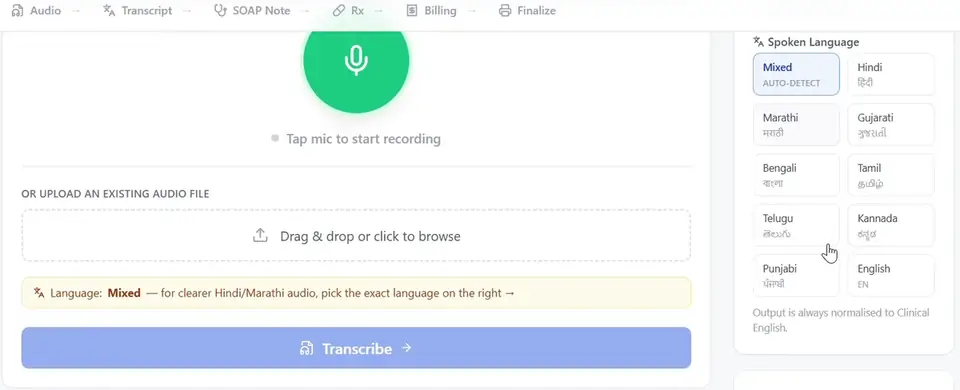
Tap the microphone to record the consultation in the app, or upload an audio recording you already have. Press Transcribe and MedicVoice turns the audio into text. The original transcript, as spoken, stays visible so you can check the result.
Multilingual documentation
Dictate in Hindi, Marathi, English or a natural mix of them. The language picker also includes Gujarati, Bengali, Tamil, Telugu, Kannada, Punjabi. Leave it on Mixed to auto-detect, or choose the exact language for clearer Hindi or Marathi audio. If the detected language is wrong, force a language and transcribe again.
Whatever you speak, the output is normalised into clinical English that you can edit.
Editable SOAP notes
MedicVoice organises the consultation into a structured note:
- S · Subjective
- Complaints and patient history.
- O · Objective
- Examination findings and observations.
- A · Assessment
- The clinician's documented assessment.
- P · Plan
- Treatment, investigations, prescriptions and follow-up.
Each specialty adds its own fields, such as tooth chart for Dental or visual acuity for Ophthalmology. Review, correct and add information before saving.
Patient management
Add a patient with name, age, sex and an optional phone number while starting a case, or pick someone already on your list. Saved consultations are kept under Notes and your patient list under Patients.
Prescriptions
Prepare the prescription in the Rx step of each case and edit it before you save or print the case.
Prescription packages
Save combinations you prescribe often as Rx packages. Apply a package to a new case, then change medicines or instructions for that patient without altering the saved package.
Attachments
Attach CT, MRI or X-ray images and previous prescriptions to a case. Each file can be up to 8 MB and large images are compressed automatically. Click a file to preview it; attached documents print with the case paper.
Appointments and WhatsApp reminders
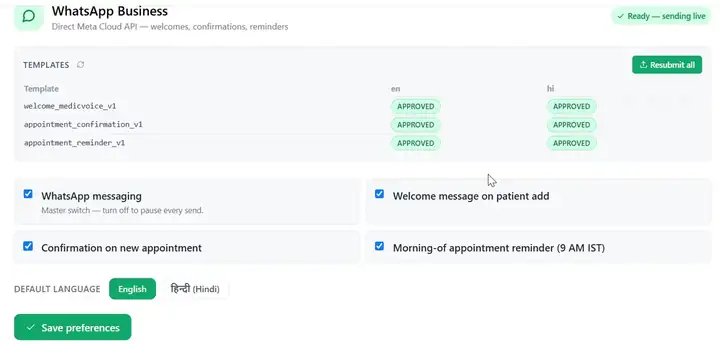
Connect your clinic's WhatsApp Business number through Meta's Cloud API in Settings. Then choose which messages go out automatically:
- Welcome message when you add a patient
- Confirmation when an appointment is booked
- Reminder at 9 AM IST on the day of the appointment
Messages use approved templates in English or Hindi, and a master switch pauses every send. Patient replies arrive in WA Inbox, where you can draft a reply with AI, edit it and send it from your clinic number. Only message patients who have agreed to receive WhatsApp messages from your clinic.
Doctor and clinic branding
Add your clinic name, logo, address, doctor name and medical registration number in Settings. Printed case papers show your clinic header, the patient details, the clinical note, billing, attached documents and your name in the signature block.
Anatomy library and Medical AI Studio
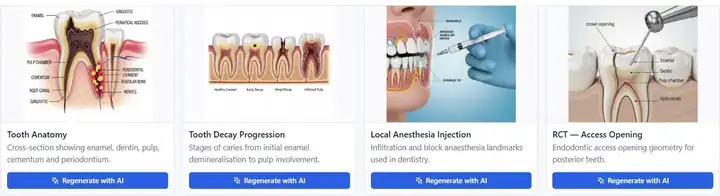
Open labelled illustrations for your specialty full screen during the consultation to explain a procedure to the patient. On Pro, Medical AI Studio generates custom medical images from a text description using Studio credits. Explainer videos are listed in the app as coming soon.
Settings
Settings holds your profile and clinic branding, your registration number, WhatsApp preferences and your subscription. Your specialty is shown there as fixed at registration.
Subscriptions and usage
Start your 7-day free trial with 5 free SOAP notes. The trial ends after 7 days or when all 5 free SOAP notes are used, whichever comes first. Basic includes 50 SOAP notes a month and Pro includes 100; the allowance resets each billing cycle. Top-up notes carry forward. The Account page shows your plan and lets you upgrade. See pricing.
Refer and earn
Share your referral code with other doctors. When a doctor you referred generates their first SOAP note, you both get 5 bonus notes, for up to 20 successful referrals.
Try it on your next consultation
Start your 7-day free trial with 5 free SOAP notes. Dictate one case and review the note MedicVoice prepares for you.